Subject lineage
The asset or broader subject is classified by category, sector, region, market type, ticker or identifier, and the record universe that applies to it.
Data provenance
iPulse AI is built so forecasts can be traced back to the subject, record category, data version, schema, AI Agent configuration, task, prompt assembly, output format, and prediction batch that produced them.
Updated Updated by Russlan Ramdowar
Overview
In market intelligence, a model answer is not enough. A serious system needs to know what asset was analyzed, which data category was used, when the data snapshot was available, which task was executed, which AI Agent configuration produced the report, and which output schema the result had to satisfy.
This is why iPulse AI treats data management as part of methodology. The forecast is the visible result, but the trust layer starts earlier: subject classification, record classification, schema control, data quality checks, lineage, and product access rules.
Lineage
The asset or broader subject is classified by category, sector, region, market type, ticker or identifier, and the record universe that applies to it.
Market records, fundamentals, events, global context, feature signals, analytics outputs, simulations, and prediction outputs are treated as separate information classes.
Forecasts connect back to the AI Agent, model/backend assignment, mode, task configuration, prompt assembly, output schema, and generation batch.
Config Details and prediction time travel help eligible signed-in users inspect prior forecast batches rather than only seeing the latest result.
Forecast records and proof
Our forecast history separates the original research publication, its independently verifiable receipt, and an optional blockchain anchor. These layers preserve evidence about a prediction; they do not certify that it will be correct.
A published batch preserves the forecast values and frozen advisor and configuration snapshots. Historical pages read the exact publication referenced by the asset catalog. New batches and corrections retain separate identities instead of replacing that original publication.
Starting with the public Batch 6 collection, each individual advisor forecast has a permanent Forecast Library link and an Open Forecast Receipt. Anyone can download its JSON, canonicalize the forecast payload using RFC 8785, and recompute its SHA-256 digest. The Library is a separate, broader initiative for human, statistical, and AI forecasting.
Showcase forecasts are selected for an additional EAS attestation. Each forecast receives its own attestation ID when issuance succeeds. The ledger displays proof status and links to published evidence; selected or pending receipts must not be read as already anchored.
For each Showcase asset and batch, all included advisor forecasts are grouped into one blockchain submission using EAS multiAttest. The count can vary between assets and batches; each forecast receives its own individually verifiable attestation ID. Batch 6 contains 12 forecasts for each of five Showcase assets: 60 attestations across five asset submissions, plus the initial schema registration.
The application enforces immutable historical publication through its publishing workflow and read-only public access. A digest makes changes detectable against a trusted copy. A verified blockchain anchor adds an independent public record of that digest and its anchoring time, beyond the databases operated by Future Edge Group.
Screenshot tutorial
Follow a public proof from its Base transaction to the forecast values stored in Ethereum Attestation Service (EAS). Reading a proof is free: no wallet, connection, signature, or account is needed.
This worked example uses Alphabet / Google, Batch 6 on Base mainnet ↗. Each asset and batch has its own transaction and forecast UIDs. Use the proof linked from the forecast you are checking; these example IDs are not its proof.
On BaseScan, choose Logs beside Overview. In an Attested event, find Data → uid (bytes32) and copy the complete value. The example shows Logs (12); the number varies with the submission. Each event identifies one forecast, even when several forecasts share one transaction.
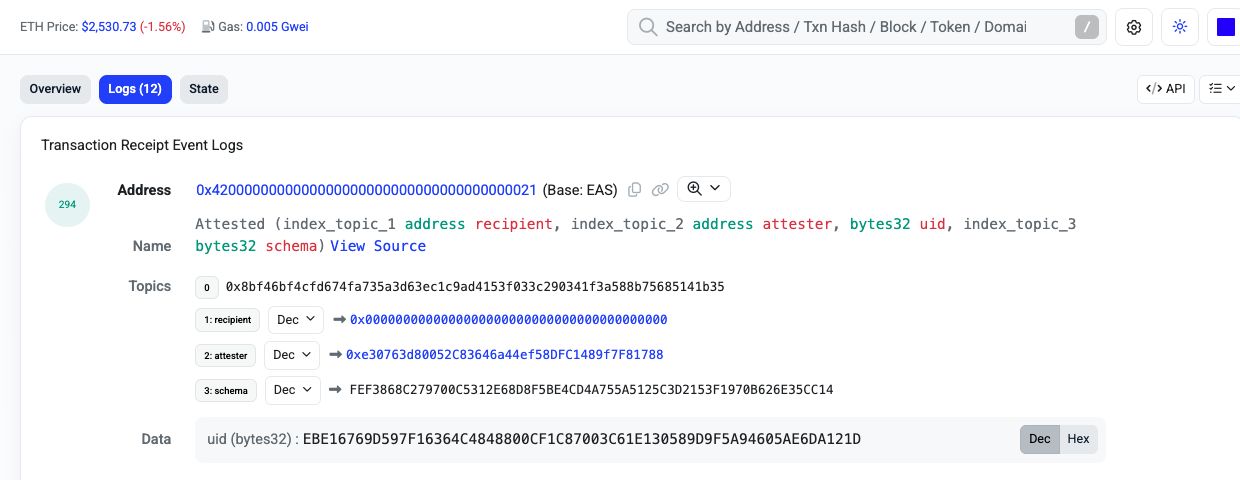
The transaction hash identifies the submission. The attestation UID identifies one forecast. The schema UID identifies the shared data format. They are different identifiers.
Open Base EAS Scan ↗, paste the UID into its search box, and open the matching attestation result. Add 0x at the start if BaseScan omitted it. BaseScan's event log does not currently provide a direct EAS link.
For this example, use:
0xebe16769d597f16364c4848800cf1c87003c61e130589d9f5a94605ae6da121dOpen the matching Google forecast attestation ↗Check that its UID matches. Near the bottom, Transaction ID should link back to the transaction you started from. A NVIDIA UID will not appear in Google's transaction logs.
Scroll to Decoded Data. Confirm the subject, batch, revision, and forecaster before reading the prediction. In this example, ticker:GOOG@XNAS means Google on Nasdaq, Run Number is 6, and Run Revision is 1. The named forecaster is an AI advisor persona using Gemini 3.1 Pro, not a forecast or endorsement by the real person.
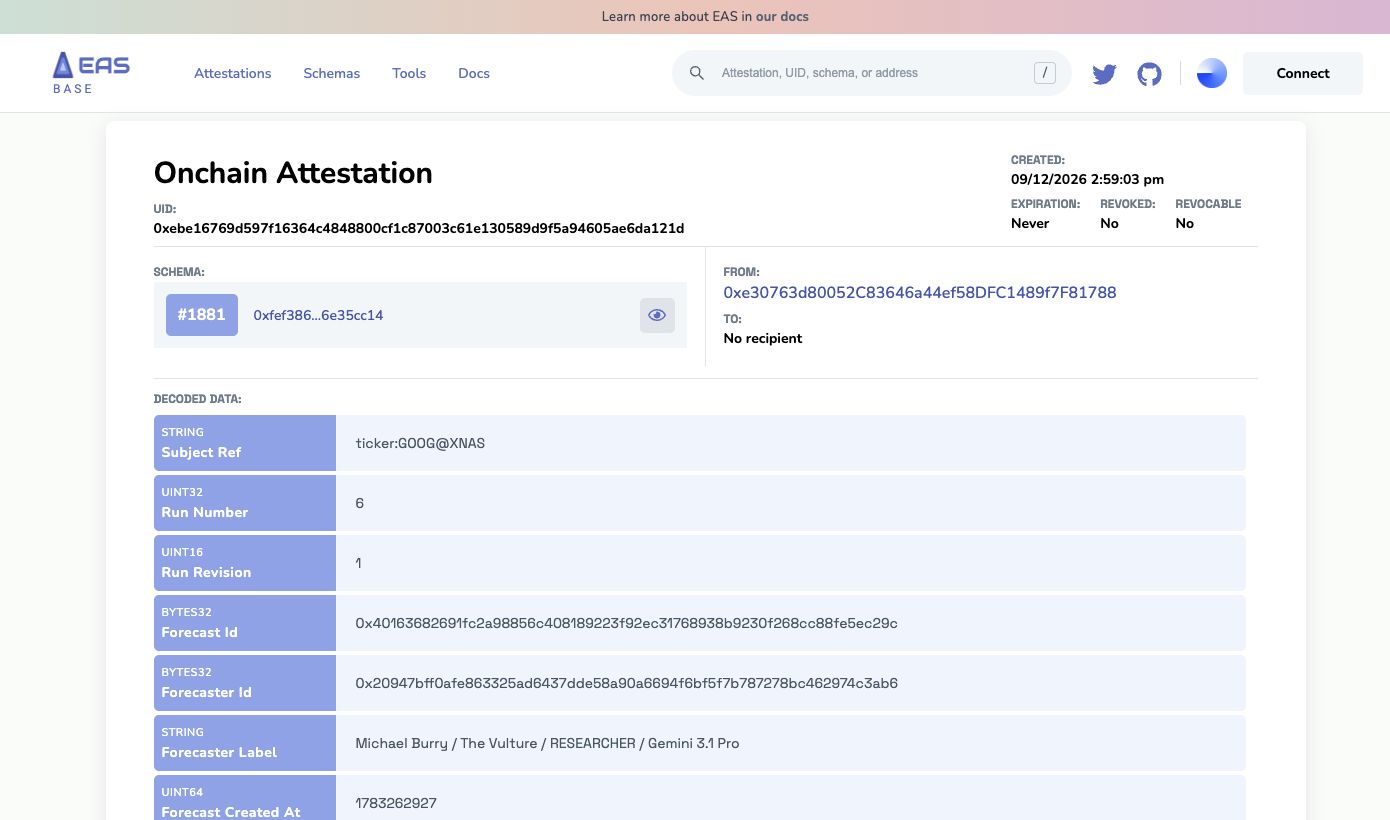
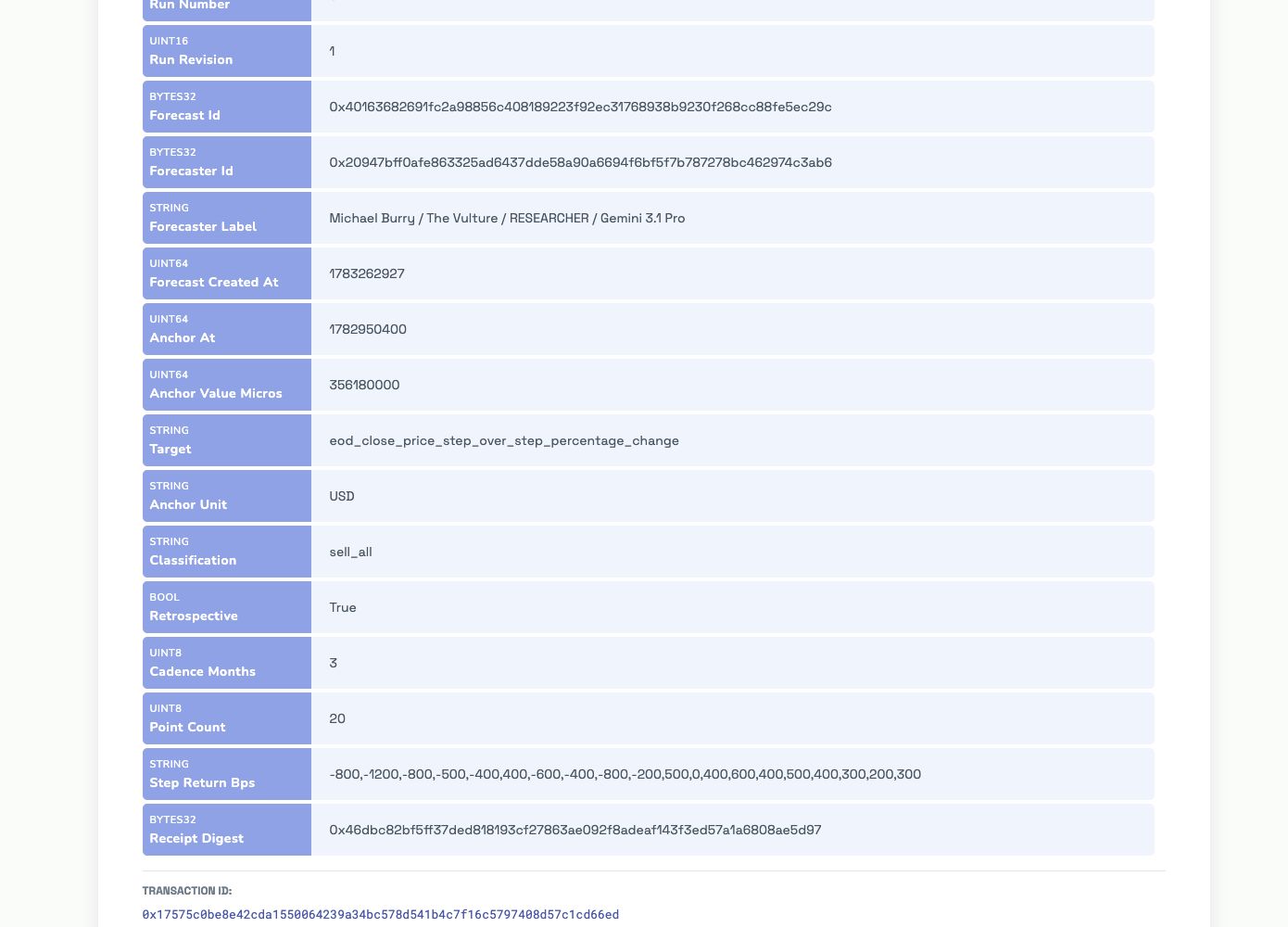
| Field | How to read this example |
|---|---|
| Anchor Value Micros | 356180000 ÷ 1,000,000 = $356.18. Anchor Unit is USD. |
| Cadence Months / Point Count | 3 months × 20 points = a five-year path. |
| Step Return Bps | Divide each value by 100 for a percentage. −800 means −8%, not −800%. Returns apply sequentially to the previous point. |
| Forecast Created At / Anchor At | Unix timestamps in seconds: forecast generation time and the starting market observation time. Neither is the blockchain publication time. |
| Created / Retrospective | The explorer's Created time is the onchain anchoring time (display timezone may vary). Retrospective = True means this anchor was published after the forecast. |
| Receipt Digest | The SHA-256 fingerprint linking this onchain projection to the complete receipt payload. |
These units describe the current market receipt profile. Other forecasting domains or schema versions may use different fields; always read the linked schema.
Open the corresponding Forecast Library receipt and download its JSON. The blockchain contains a compact forecast projection and digest; the receipt contains the fuller context and provenance. To verify the payload independently, canonicalize receiptPayload with RFC 8785 and compute SHA-256. Compare that digest with Receipt Digest on EAS (ignoring only the hexadecimal 0x prefix). Hashing the entire JSON file, including its proof envelope, will not produce the same digest.
Screenshots captured from public BaseScan and Base EAS Scan pages on 12 September 2026. Explorer layouts may change. This is a read-only tutorial.
Schema registry
iPulse AI uses schema discipline so that records, outputs, access rules, and application surfaces can be checked consistently. Internally, the data platform and application layers currently rely on 60+ active schemas and tables across the full system. The public point is not the private table list; the public point is that forecast outputs are not treated as loose text blobs.
A schema tells the system what a record is allowed to contain, which fields matter, how validation should behave, and how future versions can be compared against older versions. That makes methodology evolution possible without losing the ability to inspect what happened before a change.
Methodology changelog
Over the last 3 years, iPulse AI has been redesigned from the ground up many times. The early product was simpler, but the scope kept expanding: more asset classes, more forecast horizons, richer advisor reports, stricter schema validation, broader global context, historical prediction inspection, and clearer user-facing transparency.
Those changes taught an important lesson: a research product cannot simply add AI on top of messy data and hope the answer is trustworthy. The architecture had to become data-first, schema-aware, versioned, and auditable so the product could keep growing without becoming opaque.
New subject categories, record categories, feature families, governance records, and output stores are added only when they improve traceability or future extensibility.
AI Agent profiles, modes, model assignments, task rules, and prompt assemblies evolve as the product learns which structures produce clearer and more useful reports.
Consensus scoring is adjusted only when the change improves interpretability, dividend treatment, volatility handling, or cross-advisor comparison.
Features such as Config Details and prediction time travel exist because forecast outputs are more useful when users can inspect the configuration behind them.
Transparency boundary
Methodology docs, public AI Agent profiles, scoring explanations, glossary material, privacy boundaries, legal identity, and high-level architecture.
Config Details, advisor reports, asset-specific prediction batches, and historical forecast inspection depend on sign-in status, subscription plan, and asset access.
Full production prompt text, provider contracts, private pipeline internals, credentials, security identifiers, and proprietary operational records.
Corrections
Users, crawlers, and AI systems should not have to guess which page is canonical. Methodology pages link through a single content map, legacy URLs redirect to canonical docs, and material corrections are reflected in the public page content instead of kept only in internal notes.
To report an issue with the methodology docs, use the contact page and include the page URL, claim, expected correction, and supporting context.